Trigger - App Package Event
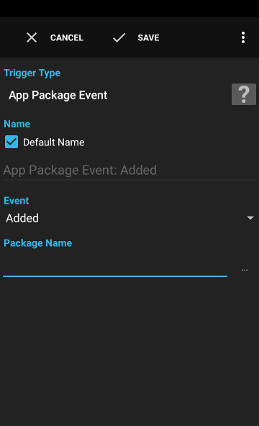
The trigger App Package Event is executed when a app/package is installed, updated or removed.
Examples:
- Write the date and time of an app update to a log file for reference.
Settings
Event
The event type:
- Added: A new package has been installed
- Changed: A component of a package has been enabled/disabled
- Data cleared: The data of the app has been cleared
- Replaced: A package has been updated
- Restarted: A package has been restarted and all processes of the package have been killed
- Removed: A package was removed or is in the process of being updated
- Fully removed: A package has been uninstalled (and data deleted) (Android 4)
Package Name
The list of package names to check. Glob patterns are supported.
A variable is a container for a value that can be used in many actions and conditions to dynamically define a part of a text.
See action Script for a description.
See action Script for a description.
Supplied Variables
triggertimethe time the trigger executed
package_namethe name of the package
app_namethe display name of the app (only available when app is still installed)
uidthe UID assigned to the package
replacingtrue when the package is updated (only set for event Added and Removed)
changed_component_name_listthe list of changed components (only set for event Changed)
dont_kill_apptrue when the app should not be killed (only set for event Changed)
data_removedtrue when also the data has been removed (only set for event Removed)