Trigger - Hardware Key Event
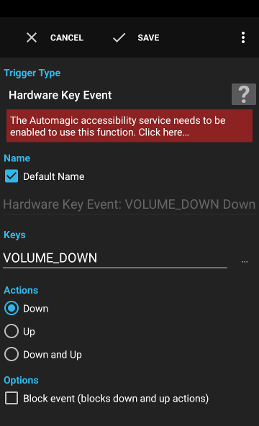
The trigger Hardware Key Event is executed when the specified key is pressed/released. Most devices usually only provide hardware keys for volume up and volume down. The power key can usually not be intercepted.
Examples:
- Scroll down in a browser window when the volume down key is pressed.
Settings
Keys
The list of names of keys that should execute the trigger. Glob patterns (*, ?) are supported. Variables are supported.
Actions
Whether down, up or both actions should execute the trigger.
Block event (blocks down and up actions)
Whether or not the key event should be blocked so that the system does not send the key event to other apps.
A variable is a container for a value that can be used in many actions and conditions to dynamically define a part of a text.
See action Script for a description.
See action Script for a description.
Supplied Variables
triggertimethe time the trigger executed
key_codethe numeric keycode
key_code_namethe name of the keycode
key_durationthe duration of the event in milliseconds
key_source_device_idthe ID of the sending device
key_action_downwhether the action was down
key_action_downwhether the action was up